As the fire crackled on, Alpaca settled into his favorite spot by the campfire, a thoughtful expression on his face. He sat in silence for a moment, watching as the flames danced and spat, before turning to Cute Frog with a twinkle in his eye.
“Cute Frog, my friend,” he said, “tonight I’ve got a tale to share with you that’ll make your eyes pop out – or should I say, test cases fail!”
Local and Remote Squish Setups
Introduction
Background and Motivation
In our extensive experience delivering Squish training and actively participating in diverse test automation projects, we have noticed a recurring challenge faced by many Squish users – the task of selecting the most suitable Squish setup tailored to their specific needs. This is challenging among both new and seasoned Squish users, given the multitude of factors influencing this decision. These factors span considerations such as the target platform of the application under test (AUT), the intricacies of CI/CD setup, the availability of hardware resources, and other pertinent elements.
Objectives of this White Paper
In this document, we aim to provide insight into the key concepts of Squish processes and their roles in the test execution process. Finally, it provides a guide to assist in the thoughtful selection of Squish setup that suits your needs. This guidance stems from our experience as Squish trainers, consultants, and test developers. This document does not cover distributed testing or testing distributed applications.
Understand Squish tools
squishrunner
squisrunner is a command-line tool designed for initiating and executing tests crafted with Squish. It interprets test scripts and communicates instructions to the squishserver. It is responsible for generating test reports. The test script evaluation occurs locally, performing file based operations and command execution on the machine where squishrunner is active. This local execution aspect holds particular significance in the context of remote testing. It is essential to grasp that the squishrunner process communicates with squishserver via the TCP/IP protocol, even when both processes run on the same machine.
A single squishrunner process can connect to multiple squishserver processes.
squishserver
squishserver is a vital component within the Squish infrastructure, operating as a command-line tool with the primary responsibility of managing applications under test.
It is done by following the commands received from squishrunner. This tool conducts various operations, including interactions with the application’s interface, capturing the present state of the application, and retrieving information about the application environment.
Upon completing the requested action, squishserver communicates feedback regarding the result back to squishrunner.
squishserver is capable of initiating new instances or hooking into already running applications.
A single squishserver process can connect to a single squishrunner at a time.
startaut
startaut is a command-line utility designed for scenarios where starting an application from a test script is not an option. Acting as a wrapper around the application, it provides a simplified approach for making the application attachable, allowing hooking into its process.
Define your target test setup
Prior to deciding how and where to set up Squish processes, it’s important to understand the requirements and limitations of the test environment. From the Squish tests perspective, the first factors we should consider are:
- Where the AUT will be launched
- What are the hardware and software capabilities of the target test platform
These two choices determine if we should focus on a fully local or remote approach.
Local setup
A test execution is considered local when all three components (squishrunner, squishserver, AUT) are running on the same machine.
Remote setup
The remote setup involves a minimum of two environments between which Squish test execution components are distributed.
Select the most suitable setup
Local Setups
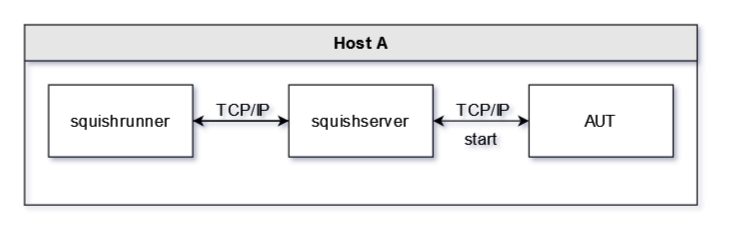
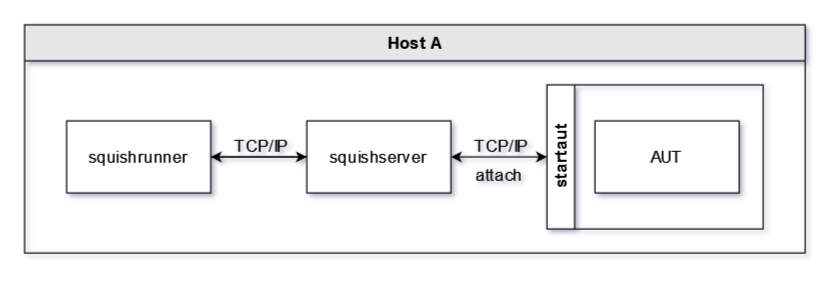
Selecting this setup is common when testing a desktop application. This is a default Squish configuration that is demonstrated in Squish tutorials.
In this configuration, squishrunner, squishserver, and application under test are launched on a single machine. All communication between Squish processes and AUT is done only on a local host. It doesn’t mean it has to be a test development environment.
Use Case
In the case of CI execution, e.g., via Jenkins, all processes can be launched on a CI server or on a CI agent – which, in many cases, is the preferred setup. This is also the solution for running tests on offline machines with no access to the network.
Limitations
The main downside of this solution is related to the way Squish performs actions on the target application. Squish moves the mouse pointer around, simulates keyboard input, changes focus between different windows and more. These actions can prevent a human user from using the test environment during test execution. Moreover, a user interacting with any input device may interrupt and break the test execution. This can be mitigated by using a dedicated test environment – either physical or virtual.
Remote Setups
Here is the list of the most common indicators that may suggest selecting the remote setup:
- AUT needs to be tested on an embedded device
- AUT requires a different operating system than the one used by a test developer
- AUT requires more resources than our local environment can offer
- AUT requires access to external systems that are not available locally
- AUT is running on a virtual machine
The concept of remote testing with Squish covers a few different setups. The suitability of each setup varies based on different criteria and factors. An important question we need to answer is where to draw the line between Squish processes and how to distribute them across test environments.
3-machine setup
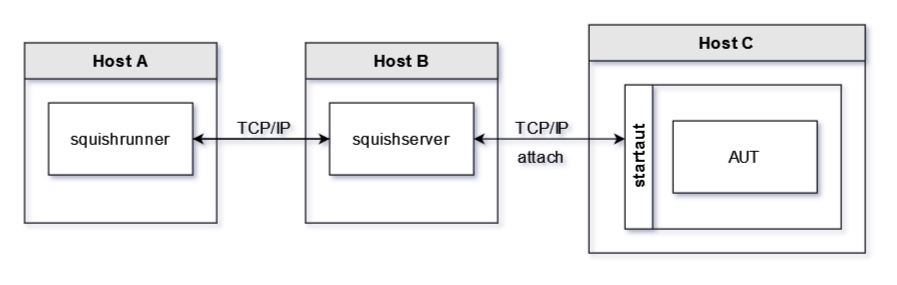
In this configuration, we use three machines: one for each test setup component. While it’s possible to use Squish this way, it may introduce additional complexity in test environment management. To streamline Squish setup, we recommend opting for one of the two-machine configurations listed below.
Limitations
This setup will not allow starting an application with the startApplication() function called from test scripts. The squishserver is capable of starting applications on the local machine only. Thus, attaching to the running application is the only option. Maintenance of three test environments is required.
2-machine setups
Setup A
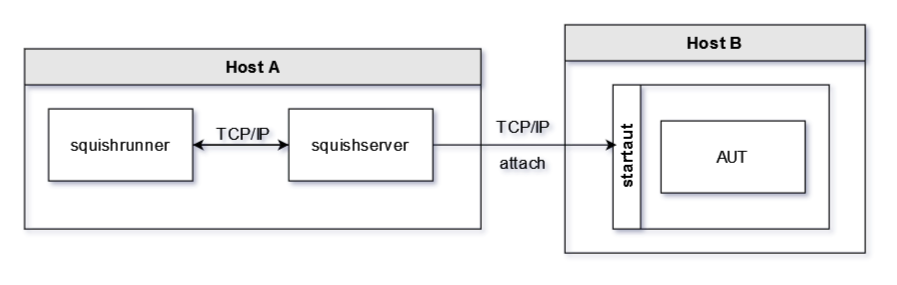
In this particular configuration, both squishrunner and squishserver run on a single machine while the application under test is on another.
Use Case
This configuration is frequently used when testing applications on embedded devices with limited resources. It’s also used in cases where initiating additional processes or installing extra software onto the target environment is restricted. In such a case, using a built-in hook might be necessary.
Limitations
Much like the 3-machine setup, the only viable option in this configuration is attaching to the running application.
Setup B
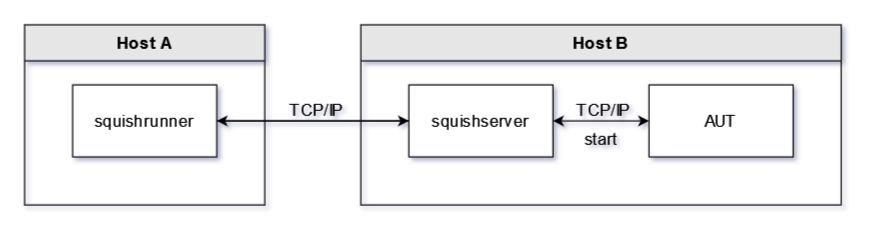
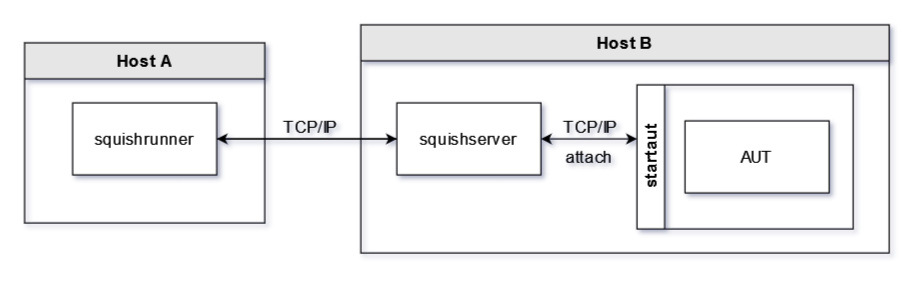
In this configuration, we place squishserver with the application under test on the same machine.
Use Case
This arrangement gives us the flexibility of both starting and attaching to the application under test. It allows us easily switching between different test environments and isolating squishserver configurations.
Leveraging the RemoteSystem API enhances our testing capabilities, allowing seamless execution of commands and file-based operations on the test environment (Host B).
Squish 7.1 introduced new Squish IDE features allowing instantaneous switching between local and remote squishservers. With this setup, users can easily utilize new features, enhancing overall testing efficiency.
In a CI setup, this configuration reduces the number of Squish components installed on CI agents.
Limitations
The initial challenge revolves around managing the squishserver process itself. Ensuring its availability during test execution may require prior access to the test environment. Common practice is keeping squishserver running perpetually by starting it during the target environment launch, e.g., by integrating the requisite commands into boot scripts. Managing test environment restarts within test scripts may be challenging, particularly due to restarting the squishserver process.
Conclusion & Next Steps
While selecting the appropriate Squish setup may seem daunting, a systematic approach involving answering a few fundamental questions and defining your target test setup will greatly simplify this process. Certain project requirements may dictate a particular configuration, however some freedom of choice is often the case. In our experience, maintaining the squishserver on the same machine as the application under test gives optimal control over its processes and the test environment. However, it’s crucial to note that this may not necessarily be the most suitable configuration for your particular case.
At the same time, don’t hesitate to make an initial decision. Due to the Squish configuration flexibility, changing from a local to a remote setup or changing a process’s location can be done seamlessly or with very little effort.
Another topic you should probably analyze and understand is the difference between starting and attaching to already running applications. Both approaches have pros and cons; you can learn about them in the Squish documentation.
Would you like to learn about our perspective on this matter or discuss any other topic related to test automation? Feel free to contact us via email at contact@cyberalpaca.com or drop us a message on LinkedIn at https://www.linkedin.com/company/cyberalpaca. We’re eager to collaborate and share our expertise with you.